dynamicEcho: A Delay That Follows Your Input Dynamics
dynamicEcho is a dynamic delay plugin where
gain reduction analyzed in the compression section drives the behavior of the delay engine.
Unlike traditional static or dynamic delays limited to the level of the processed signal, DynamicEcho allows gain reduction to control multiple delay parameters simultaneously, each with independent depth and direction.
The result is an organic delay that reacts musically to the intensity of the signal —
producing clean transients and expressive echoes that evolve with the dynamics
of the performance.
Main Architecture
- Compressor / Gain Reduction Detector
- Dynamic Delay Engine
- GR Link Controls
- Filtering and Mix Section
- Visual Monitoring
Together these sections allow the delay to adapt its behavior in real time
to the incoming signal dynamics.
Compressor Section
The compressor acts as standard compressor or only as gain-reduction detector used to drive the dynamic behavior of the delay engine.
- Sidechain Button – When enabled, the compressor analyzes the signal received through the external sidechain input.
- Threshold – Sets the level above which compression begins.
- Ratio – Determines the amount of compression applied when the signal exceeds the threshold. Even when Ratio is set to 1:1, gain reduction detection remains active. Check the commercial version for unlimited ratio range.
- Attack – Controls how quickly the compressor reacts when the signal exceeds the threshold.
- Release – Controls how quickly compression returns to unity gain after the signal falls below the threshold.
Dynamic Delay Section
The delay engine generates the spatial echo effect and can be dynamically shaped
by the GR (Gain Reduction) Link system.
- Stereo Input / Mono Input – Select whether the incoming signal is processed in stereo or averaged to mono before entering the delay engine.
- Warp Mode – Adjust the signal on the right channel relative to the left:
- Stereo for wider, layered echo effect
- Ping-Pong for bouncing delays across stereo channels
- Sync to Host – When enabled, the delay time follows the host tempo.
- Delay Time – Sets the delay interval.
- Feedback – Control the amount of signal sent back into the delay line to create longer or shorter decays.
- Pan Width – Adjusts the stereo spread of the delay signal.
GR Link Section
The GR Link system allows compression gain reduction to dynamically modify
delay parameters. Multiple parameters can be linked to gain reduction simultaneously,
each with independent depth and direction.
- Controls
- GR Feedback Link – Controls how gain reduction affects the Feedback parameter.
- GR Wet Link – Controls how gain reduction affects the Wet signal (delayed signal) level.
- Link Attack – Determines how quickly linked parameters react to gain reduction.
- Link Release – Determines how quickly linked parameters return to their base values.
- Link Behavior
- Positive Link – Feedback and Wet increase from the knob value up to 100% as gain reduction increases.
- Negative Link – Feedback and Wet decrease from the knob value down to 0% as gain reduction increases.
Linked parameters move between their knob base value and their minimum
or maximum range depending on link polarity.
Filter and Mix Section
- Filter – Shapes the tonal character of the delay signal.
- Dry Mix – Controls the level of the original signal.
- Wet Mix – Controls the level of the processed delay signal.
Visual Monitoring
dynamicEcho includes real-time visual feedback to help users understand how the
system reacts to the incoming signal.
- Input Signal Meter – Displays the incoming audio level.
- Gain Reduction Meter – Shows the amount of Gain Reduction parameter for linking or compression.
- Feedback Meter – Displays the actual Feedback value after GR Link modulation.
- Wet Meter – Displays the actual Wet level after GR Link modulation.
Key Concept
Traditional dynamic delays usually control only the wet level.
dynamicEcho introduces a more flexible system: Gain Reduction → Multi-Parameter Dynamic Control
By linking gain reduction to delay parameters such as Feedback and Wet,
dynamicEcho creates organic delays that breathe, expand, and contract with the
dynamics of the music.
Requirements:
DAW (VST2 or VST3 host), Windows 32/64bits


or MacOS VST2, VST3 and AU


How to Install - instructions page specific for dynamicEchoFree and EULA.
Changelog:
1.0 (2026-03-08)
User Manual:
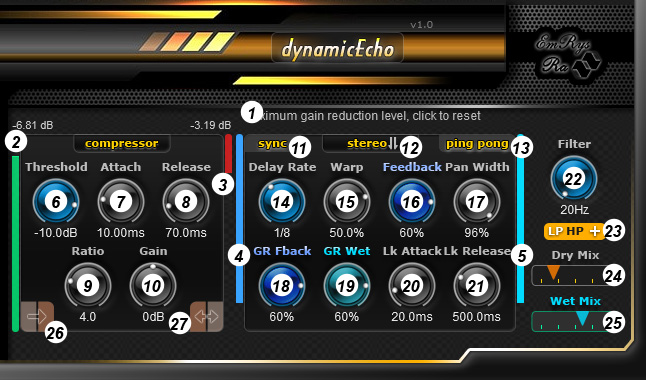
- Here you get messages information when go over the knobs with the mouse.
- Graphic bar for input level.
- Graphic bar for gain reduction level.
- Feedback meter - displays the processed Feedback value after GR (Gain Reduction) Link modulation.
- Wet Mix meter - displays the processed Wet Mix value after GR Link modulation.
- Threshold – sets the level at which compression starts.
- Attack – controls how fast the compressor responds to transients.
- Release – defines how quickly gain reduction is released.
- Ratio – determines the amount of compression applied.
- Gain – output level compensation.
- Sync delay time to your DAW's tempo.
- Button to change the input type: stereo or mono.
- Warp type: ping-pong or stereo.
- Set the main delay time.
- Warp knob: adjust the signal on the right channel relative to the left.
- Feedback: control the amount of signal sent back into the delay line to create longer or shorter decays.
- Pan Width: widen or narrow the stereo field of the delayed signal, helping to create immersive or focused echoes.
- Gain Reduction Feedback Depth Link – Controls how gain reduction affects the Feedback parameter. Even when Ratio is set to 1:1, gain reduction detection remains active.
- Gain Reduction Wet Depth Link – Controls how gain reduction affects the Wet signal (delayed signal) level. Linked parameters move between their knob base value and their minimum or maximum depending on link polarity.
- Positive Link – Feedback and Wet increase from the knob value up to 100% as gain reduction increases.
- Negative Link – Feedback and Wet decrease from the knob value down to 0% as gain reduction increases.
- Link Attack – determines how quickly linked parameters react to gain reduction. Specify that the attack from the compressor section is added to this value.
- Link Release – determines how quickly linked parameters return to their base values. Specify that the release from the compressor section is added to this value.
- Filter frequency: adjust the cutoff frequency to fine-tune the tonal shaping of the filtered delay signal.
- Switch filter to LP, HP and boosted for LP and HP.
- Dry mix: control the level of the original (unprocessed) audio signal.
- Wet mix: control the level of the processed (delayed) signal for precise blending in the mix.
- Side chain - selects the signal used by the compressor detector: input or the external sidechain signal.







 3LufsMeter


